
🔗 Project Links
Live Demo: https://abdullah-tech-shop.onrender.com
GitHub Repository: https://github.com/raihanchowdhuryengineer/AbdullahTechShop
When you grow up in a family that runs small businesses, you start noticing how much time and energy goes into simple daily tasks. My uncle owns a small gadget and electronics store, and like many others, he managed everything on paper — sales, stock, bills, you name it.
One day, he told me, “If only I had a computer system that could do all this automatically.”
That sentence stuck with me.
I decided to build one myself — not just as a tech project, but as a real tool to make his work easier. And that’s how “Abdullah’s Tech Shop POS” was born — a simple, modern shop management system built with Flask, SQLite, and Bootstrap.
Why I Chose This Project
I wanted to create something useful — something that actually solves a real problem. I also wanted a project that could strengthen my Python, database, and full-stack skills while being simple enough to deploy for free.
The system had to:
Manage products (SKU, name, category, prices, stock)
Generate customer bills with name, address, and payment method
Automatically reduce stock after each sale
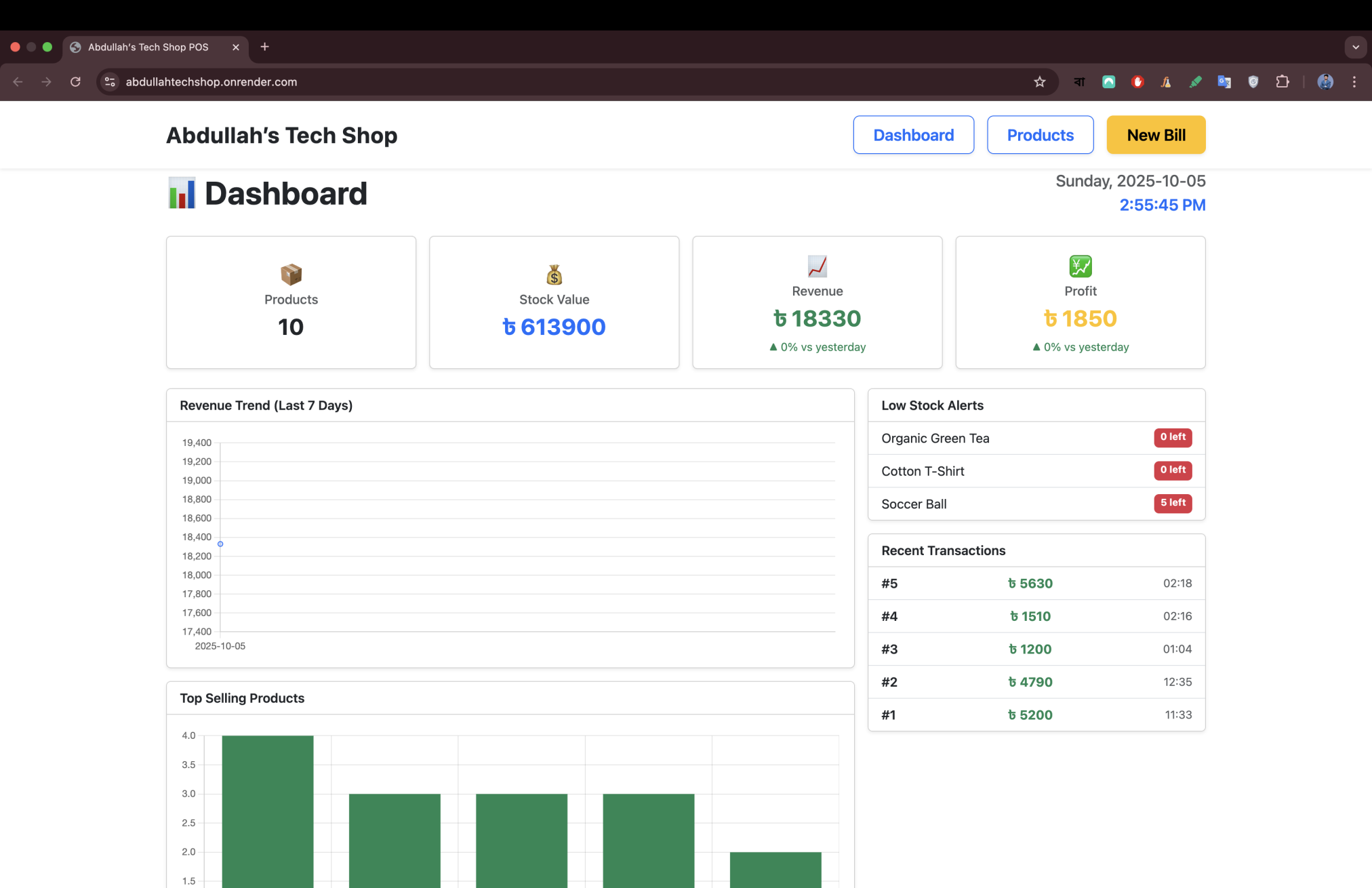
Show real-time profit, revenue, and stock value on a dashboard
Look clean, easy to use, and localized in Taka (৳)
Basically, a digital version of my uncle’s notebook — but smarter.
Designing the Dashboard
I wanted the design to feel like something a non-technical person could use easily.
So I made four large cards at the top —
Products, Stock Value, Revenue, and Profit — all updated automatically.
Below that, the dashboard shows:
📈 a 7-day revenue chart,
📦 top-selling products,
⚠️ low-stock alerts, and
🧾 recent transactions (you can click one to view its bill).
The goal was to make it clear, friendly, and professional — so even someone with little tech knowledge could navigate confidently.
Billing That Feels Real
The billing section lets the user:
Select products and quantities
Add customer details (name, phone, address)
Choose payment method (Cash / Bkash / Card / Online)
Instantly see total, profit, and remaining stock
It also generates a printable invoice branded with my uncle’s store name and motto:
“A leading retail chain store for 113+ top brands of smartphones, laptops, gadgets & more — Your ultimate tech destination!”
It’s practical, clean, and works perfectly on both computer and tablet screens.
The Challenges
Oh, there were many.
At one point, I kept getting this error:sqlite3.OperationalError: no such column: sku
That’s when I learned about database migrations — how changes in code don’t automatically update the database structure.
Another big challenge was designing a UI that felt “shop-friendly.” My uncle said the buttons and text were too small, so I rebuilt everything with bigger fonts, larger buttons, and equal box sizes.
It was a great reminder that real usability feedback doesn’t come from developers — it comes from the people who actually use your app.
Taking It Online (Free!)
I pushed my code to GitHub under:
🔗 github.com/raihanchowdhuryengineer/AbdullahTechShop
Then I deployed it on Render.com — completely free.
Here’s how easy it was:
Logged into Render with GitHub
Created a new Web Service
Set
Build Command:
pip install -r requirements.txtStart Command:
gunicorn app:app
Clicked Deploy
Two minutes later, Render gave me my live URL:
🌐 https://abdullah-tech-shop.onrender.com
Seeing my own app live felt amazing.
My uncle opened it at his store and smiled, “Now this looks like a real system!”
That’s when I knew the project was a success.
What I Learned
Final Thoughts
This project started as a way to help my uncle, but it ended up helping me grow as a developer.
It taught me how to connect code to people’s everyday lives — and that’s what software is really about.
If you’re a student or self-taught coder reading this, remember:
You don’t need to build the next Facebook — just build something that helps someone you know.
Because that’s how you learn, and that’s how you make an impact.